session
클라이언트 요청에 대한 context 정보의 세션과 관련된 정보(데이터)를 저장하고 관리하는 내부 객체.
내부 객체는 JSP 페이지 내의 스크립트릿에서 묵시적으로 사용할 수 있지만 session 객체는 page 지시자의 session 속성이 true(기본값)로 설정되어 있어야 사용할 수 있다. 그러나 JSP 페이지 중에 session 객체가 필요 없는 페이지라면 session 속성을 false로 설정하는 것이 자원 활용에 도움이 된다.
session 내부 객체 메서드
| 메서드 | 설명 |
| String getId() | 해당 세션의 세션 ID를 반환 |
| long getCreationTime() | 세션의 생성된 시간을 반환 |
| long getLastAccessedTime() | 클라이언트 요청이 마지막으로 시도된 시간을 반환 |
| void setMaxinactiveInterval(time) | 세션을 유지할 시간을 초단위로 설정 |
| int getMaxinactiveInterval() | string을 브라우저에 출력 |
| boolean isNew() | 클라이언트 세션 ID를 할당하지 않은 경우 true 값을 반환 |
| void invalidate() | 해당 세션을 종료 |
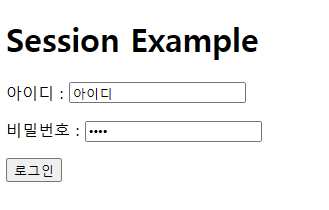
session1.html
<!DOCTYPE html>
<html>
<head>
<meta charset="UTF-8">
<title>Insert title here</title>
</head>
<body>
	<h1>Session Example</h1>
	<form method="post" action="session1.jsp">
	아이디 : <input name="id"><p/>
	비밀번호 : <input type="password" name="pwd"><p/>
	<input type="submit" value="로그인">
	</form>
</body>
</html>
session1.jsp
<%@ page language="java" contentType="text/html; charset=UTF-8"
    pageEncoding="UTF-8" session="true"%>
<%
	request.setCharacterEncoding("UTF-8");

	String id = request.getParameter("id");
	String pwd = request.getParameter("pwd");

	session.setAttribute("idKey", id);
	session.setMaxInactiveInterval(60*5);
%>
<h1>Session Example</h1>
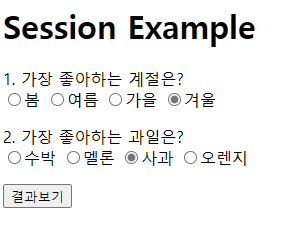
<form method="post" action="session1_1.jsp">
1. 가장 좋아하는 계절은?<br/>
<input type="radio" name="season" value="봄">봄
<input type="radio" name="season" value="여름">여름
<input type="radio" name="season" value="가을">가을
<input type="radio" name="season" value="겨울">겨울<p/>

2. 가장 좋아하는 과일은?<br/>
<input type="radio" name="fruit" value="watermelon">수박
<input type="radio" name="fruit" value="melon">멜론
<input type="radio" name="fruit" value="apple">사과
<input type="radio" name="fruit" value="orange">오렌지<p/>
<input type="submit" value="결과보기">
</form>
session1_1.jsp
<%@ page language="java" contentType="text/html; charset=UTF-8"
    pageEncoding="UTF-8"%>
<%
	request.setCharacterEncoding("UTF-8");

	String season = request.getParameter("season");
	String fruit = request.getParameter("fruit");
	String id = (String)session.getAttribute("idkey");

	String sessionId = session.getId();

	int intervalTime = session.getMaxInactiveInterval();

	if(id != null){
%>
<h1>Session Example</h1>
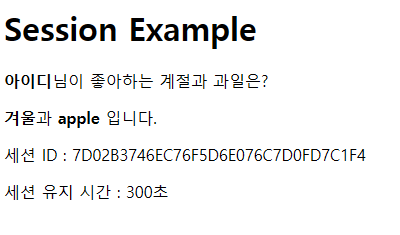
<b><%=id%></b>님이 좋아하는 계절과 과일은?<p/>
<b><%=season%></b>과 <b><%=fruit%></b> 입니다.<p/>
세션 ID : <%=sessionId%><p/>
세션 유지 시간 : <%=intervalTime%>초<p/>
<%
	session.invalidate();
	} else {
	out.println("세션의 시간이 경고하였거나 다른 이유로 연결을 할 수 없습니다.");
	session의 시간 경과 또는 다른 이유로 session 객체의 연결이 종료 되었습니다.
	}
%>
출력 결과

application
서블릿 또는 애플리케이션 외부 환경 정보(Context)를 나타내는 내부 객체이다. application 객체를 통해서 애플리케이션이 실행되는 서버의 정보와 서버 측 자원에 대한 정보를 얻어내거나 애플리케이션이 실행하고 있는 동안에 발생할 수 있는 이벤트 로그와 관련된 기능들을 제공한다. application 객체는 javax.servlet.ServletContext 객체 타입으로 제공한다.
application 내부 객체 메서드
| 메서드 | 설명 |
| String getServerInfo() | 서블릿 컨테이너의 이름과 버전을 반환 |
| String getMimeType(fileName) | 지정한 파일의 MIME 타입을 반환 |
| String getRealPath(url) | URL을 로컬 파일 시스템으로 변경하여 반환 |
| void log(message) | 로그 파일에 message를 기록 |
application1.jsp
<%@ page language="java" contentType="text/html; charset=UTF-8"
    pageEncoding="UTF-8"%>
<%
	String serverInfo = application.getServerInfo();
	String mimeType = application.getMimeType("request1.html");

	String realPath = application.getRealPath("/");
	application.log("application 내부 객체 로그 테스트");
%>
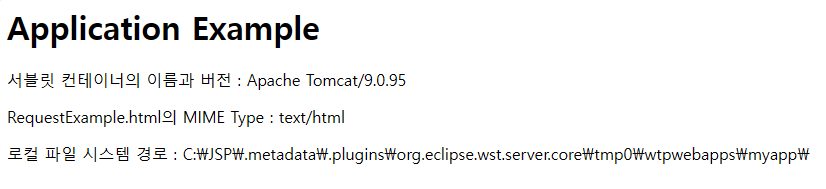
<h1>Application Example</h1>
서블릿 컨테이너의 이름과 버전 : <%=serverInfo%><p/>
RequestExample.html의 MIME Type : <%=mimeType%><p/>
로컬 파일 시스템 경로 : <%=realPath%>
출력 결과
pageContext
현재 JSP 페이지의 Context를 나타내며, pageContext 내부 객체를 통해서 다른 내부 객체에 접근할 수 있다.
예를 들어 out 내부 객체를 구하고자 할 경우의 코드는 다음과 같다.
JspWriter pageOut = pageContext.getOut();
또한 pageContext 객체는 javax.jsp.PageContext 클래스 타입으로 제공되는 JSP 내부 객체 메서드이다.
pageContext 내부 객체 메서드
| 메서드 | 설명 |
| ServletRequest getRequest() | 페이지 요청 정보를 담고 있는 객체를 반환 |
| ServletResponse getResponse() | 페이지 요청에 대한 응답 객체를 반환 |
| JspWriter getOut() | 페이지 요청에 대한 응답 출력 스트림을 반환 |
| HttpSession getSession() | 요청한 클라이언트의 세션 정보를 담고 있는 객체를 반환 |
| ServletContext getServletContext() | 페이지에 대한 서블릿 실행 환경 정보를 담고 있는 객체를 반환 |
| Object getPage() | 페이지의 서블릿 객체를 반환 |
| ServletConfig getServletConfig() | 페이지의 서블릿 초기 정보의 설정 정보를 담고 있는 객체를 반환 |
| Exception getException() | 페이지 실행 중에 발생되는 에러 페이지에 대한 예외 객체를 반환 |
pageContext.jsp
<%@ page contentType="text/html;charset=UTF-8" language="java" %>
<html>
<head>
    <title>PageContext Example</title>
</head>
<body>
<%
    // Page Scope 변수 설정
    String pageMessage = "Hello from Page Scope!";
    pageContext.setAttribute("pageMessage", pageMessage);

    // Request Scope 변수 설정
    String requestMessage = "Hello from Request Scope!";
    request.setAttribute("requestMessage", requestMessage);

    // Session Scope 변수 설정
    String sessionMessage = "Hello from Session Scope!";
    session.setAttribute("sessionMessage", sessionMessage);

    // Application Scope 변수 설정
    String appMessage = "Hello from Application Scope!";
    application.setAttribute("appMessage", appMessage);
%>

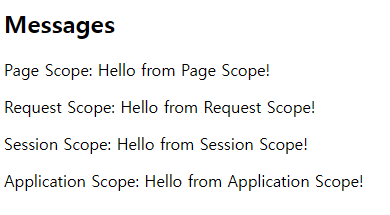
<h2>Messages</h2>
<p>Page Scope: <%= pageContext.getAttribute("pageMessage") %></p>
<p>Request Scope: <%= request.getAttribute("requestMessage") %></p>
<p>Session Scope: <%= session.getAttribute("sessionMessage") %></p>
<p>Application Scope: <%= application.getAttribute("appMessage") %></p>
</body>
</html>
출력 결과
'Web Programming > JSP' 카테고리의 다른 글
| [JSP] 예외 내부 객체 (0) | 2024.10.04 |
|---|---|
| [JSP] 서블릿 관련 내부 객체 (0) | 2024.10.04 |
| [JSP] 입출력 관련 내부 객체 (1) | 2024.10.04 |
| [JSP] 내부 객체 (0) | 2024.10.04 |
| [JSP] 액션 태그 (1) | 2024.10.02 |