<환경 설정>
application.yml
spring:
  application:
    name:test-spring
  datasource:
    url: jdbc:h2:tcp://localhost/~/test1
    driver-class-name: org.h2.Driver
    username: sa
  jpa:
    hibernate:
      ddl-auto: create #나중에 update로 바꾸어주기
    properties:
      hibernate:
        format_sql: true
  thymeleaf:
    prefix: classpath:/templates/
    suffix: .html

logging:
  level:
    org.hibernate.SQL: debug
    org.hibernate.orm.jdbc.bind: trace
layout-dialect를 사용하기 위해서 build.gradle에 다음 코드 추가
implementation 'nz.net.ultraq.thymeleaf:thymeleaf-layout-dialect'
static에 css, js 경로 생성 후 부트스트랩 파일 추가

<Back>
DAO 생성
Contact.java
package test.test_spring.dao;

import jakarta.persistence.Entity;
import jakarta.persistence.GeneratedValue;
import jakarta.persistence.GenerationType;
import jakarta.persistence.Id;
import lombok.Getter;
import lombok.Setter;

@Entity
@Getter @Setter
public class Contact {
    @Id
    @GeneratedValue(strategy = GenerationType.IDENTITY)
    private Long id;

    private String name;

    private String tel;

    private String email;

    @Column(columnDefinition = "TEXT")
    private String inquire;

    private boolean newsletter;
}
DTO 생성
ContactForm.java
package test.test_spring.dto;

import jakarta.validation.constraints.NotEmpty;
import lombok.Getter;
import lombok.Setter;

@Getter @Setter
public class ContactForm {

    private Long id;

    @NotEmpty(message = "이름은 필수 항목입니다.")
    private String name;

    @NotEmpty(message = "전화번호는 필수 항목입니다.")
    private String tel;

    @NotEmpty(message = "이메일은 필수 항목입니다.")
    private String email;

    @NotEmpty(message = "문의사항은 필수 항목입니다.")
    private String inquire;

    private boolean newsletter;
}
리포지토리 생성
ContactRepository.java
package test.test_spring.repository;

import org.springframework.data.jpa.repository.JpaRepository;
import test.test_spring1.dao.Contact;

public interface ContactRepository extends JpaRepository<Contact, Long> {
}
서비스 생성
ContactService.java
package test.test_spring.service;

import lombok.RequiredArgsConstructor;
import org.springframework.stereotype.Service;
import test.test_spring1.dao.Contact;
import test.test_spring1.repository.ContactRepository;

import java.util.List;
import java.util.Optional;

@Service
@RequiredArgsConstructor
public class ContactService {

    private final ContactRepository contactRepository;

    //저장
    public Long save(Contact contact){
        contactRepository.save(contact);
        return contact.getId();
    }

    //리스트 조회
    public List<Contact> findAll(){
        return contactRepository.findAll();
    }

    //하나만 조회
    public Optional<Contact> findOne(Long id){
        return contactRepository.findById(id);
    }

    //삭제
    public void delete(Long id){
        this.contactRepository.deleteById(id);
    }
}
컨트롤러 생성
ContactController.java
package test.test_spring.controller;

import jakarta.validation.Valid;
import lombok.RequiredArgsConstructor;
import org.springframework.stereotype.Controller;
import org.springframework.ui.Model;
import org.springframework.validation.BindingResult;
import org.springframework.web.bind.annotation.GetMapping;
import org.springframework.web.bind.annotation.ModelAttribute;
import org.springframework.web.bind.annotation.PathVariable;
import org.springframework.web.bind.annotation.PostMapping;
import test.test_spring1.dao.Contact;
import test.test_spring1.dto.ContactForm;
import test.test_spring1.service.ContactService;

import java.util.List;
import java.util.Optional;

@Controller
@RequiredArgsConstructor
public class ContactController {

    private final ContactService contactService;

    //홈 화면
    @GetMapping("/")
    public String home(Model model){
        ContactForm contactForm = new ContactForm();
        contactForm.setNewsletter(true);
        model.addAttribute("contactForm", contactForm);
        return "home";
    }

    //문의 등록
    @PostMapping("/")
    public String contactCreate(@Valid @ModelAttribute("contactForm") ContactForm contactForm, BindingResult bindingResult){

        if(bindingResult.hasErrors()){
            return "home";
        }

        Contact contact = new Contact();
        contact.setName(contactForm.getName());
        contact.setTel(contactForm.getTel());
        contact.setEmail(contactForm.getEmail());
        contact.setInquire(contactForm.getInquire());
        contact.setNewsletter(contactForm.isNewsletter());
        contactService.save(contact);
        return "redirect:/contactList";
    }

    //문의리스트
    @GetMapping("/contactList")
    public String contactList(Model model) {
        List<Contact> contacts = contactService.findAll();
        model.addAttribute("contacts", contacts);
        return "page/contactList";
    }

    //문의 한 개 가져오기
    @GetMapping("/contactList/modify/{id}")
    public String contactModifyForm(@PathVariable("id") Long id, Model model){
        Optional<Contact> findOne = contactService.findOne(id);
        Contact contactGet = findOne.get();

        if(findOne.isPresent()){
            ContactForm contactForm = new ContactForm();
            contactForm.setId(contactGet.getId());
            contactForm.setName(contactGet.getName());
            contactForm.setTel(contactGet.getTel());
            contactForm.setEmail(contactGet.getEmail());
            contactForm.setInquire(contactGet.getInquire());
            contactForm.setNewsletter(contactGet.isNewsletter());

            model.addAttribute("contactForm", contactForm);
        }

        return "page/contactModify";
    }

    //문의 수정
    @PostMapping("/contactList/modify/{id}")
    public String contactModify(@Valid @ModelAttribute("contactForm") ContactForm contactForm, BindingResult bindingResult){

        if(bindingResult.hasErrors()){
            return "page/contactModify";
        }

        Contact contact = new Contact();
        contact.setId(contactForm.getId());
        contact.setName(contactForm.getName());
        contact.setTel(contactForm.getTel());
        contact.setEmail(contactForm.getEmail());
        contact.setInquire(contactForm.getInquire());
        contact.setNewsletter(contactForm.isNewsletter());
        contactService.save(contact);
        return "redirect:/contactList";
    }

    //문의 삭제
    @GetMapping("/contactList/delete/{id}")
    public String contactDelete(@PathVariable("id") Long id){
        Optional<Contact> findOne = contactService.findOne(id);
        if(findOne.isPresent()){
            contactService.delete(findOne.get().getId());
        }
        return "redirect:/contactList";
    }
}
<View>
레이아웃
layout.html
<!DOCTYPE html>
<html lang="ko" xmlns:layout="http://www.ultraq.net.nz/thymeleaf/layout">
<head>
    <meta charset="UTF-8">
    <title>이젠 인테리어</title>
    <meta name="viewport" content="width=device-width, initial-scale=1.0">
    <link th:href="@{/css/bootstrap.min.css}" rel="stylesheet">
</head>
<body>
<!-- 네비게이션 바 -->
<nav th:replace="~{layout/navbar :: navbarFragment}"></nav>

<!-- 기본 템플릿 안에 삽입될 내용 Start -->
<th:block layout:fragment="content"></th:block>
<!-- 기본 템플릿 안에 삽입될 내용 End -->

<!-- 푸터 -->
<footer th:replace="~{layout/footer :: footerFragment}"></footer>

<!-- 자바스크립트 -->
<script th:src="@{/js/bootstrap.bundle.min.js}"></script>
</body>
</html>
navbar.html
<nav th:fragment="navbarFragment" class="navbar navbar-expand-md bg-body-tertiary border-bottom border-2 border-secondary">
    <div class="container-fluid">
        <a class="navbar-brand" th:href="@{/}">이젠 인테리어</a>
        <button class="navbar-toggler" type="button" data-bs-toggle="collapse" data-bs-target="#navbarSupportedContent" aria-controls="navbarSupportedContent" aria-expanded="false" aria-label="Toggle navigation">
            <span class="navbar-toggler-icon"></span>
        </button>
        <div class="collapse navbar-collapse" id="navbarSupportedContent">
            <ul class="navbar-nav me-auto mb-2 mb-lg-0">
                <li class="nav-item">
                    <a class="nav-link" th:href="@{/contactList}">문의리스트</a>
                </li>
            </ul>
        </div>
    </div>
</nav>
footer.html
<footer class="bg-body-tertiary text-center py-2 mt-5 border-top border-2 border-secondary" th:fragment="footerFragment">
    <p class="my-3">Copyright 2024. 이젠인테리어 Co. All rights reserved.</p>
</footer>
홈 화면
home.html
<html layout:decorate="~{layout/layout}" xmlns:layout="http://www.ultraq.net.nz/thymeleaf/layout">
<div class="container my-5" layout:fragment="content">
    <div class="row">
        <div class="col-md">
            <div class="ratio ratio-16x9 mb-5">
                <iframe src="https://www.youtube.com/embed/ek1f3JpI27Q" title="중정형 안마당이 있는 여주시 30평대 아늑한 단층 전원주택 - 더존하우징 Cozy house" frameborder="0" allow="accelerometer; autoplay; clipboard-write; encrypted-media; gyroscope; picture-in-picture; web-share" referrerpolicy="strict-origin-when-cross-origin" allowfullscreen></iframe>
            </div>
            <div class="d-none d-md-block">
              <ul>
                  <li>인테리어 견적 바로가기</li>
                  <li>전원주택 인테리어</li>
                  <li>아파트 30평대 인테리어</li>
                  <li>단층 전원주택 인테리어</li>
                  <li>거실 창호 견적</li>
                  <li>정원 가꾸기 인테리어</li>
              </ul>
            </div>
        </div>

        <div class="col-md">
            <form class="p-5 bg-warning" th:object="${contactForm}" method="post">
                <div th:if="${#fields.hasErrors()}" class="alert alert-warning" role="alert">
                    <div th:each="err : ${#fields.allErrors()}" th:text="${err}">
                        전체 오류 메시지
                    </div>
                </div>
                <div class="mb-3">
                    <label th:for="name" class="form-label">이름</label>
                    <input type="text" class="form-control bg-warning border-black" th:field="*{name}" placeholder="이름을 입력하세요">
                </div>
                <div class="mb-3">
                    <label th:for="tel" class="form-label">전화번호</label>
                    <input type="text" class="form-control bg-warning border-black" th:field="*{tel}" placeholder="전화번호를 입력하세요">
                </div>
                <div class="mb-3">
                    <label th:for="email" class="form-label">이메일</label>
                    <input type="text" class="form-control bg-warning border-black" th:field="*{email}" placeholder="email@abc.com">
                </div>
                <div class="mb-3">
                    <label th:for="inquire" class="form-label">문의 사항</label>
                    <textarea class="form-control bg-warning border-black" th:field="*{inquire}" rows="5" placeholder="문의 사항을 남겨주세요."></textarea>
                </div>
                <div class="form-check">
                    <input class="form-check-input" type="checkbox" th:field="*{newsletter}">
                    <label class="form-check-label" th:for="newsletter">
                        이젠 인테리어 뉴스레터 받아보기
                    </label>
                </div>
                <div class="mt-3 text-end">
                    <button type="submit" class="btn btn-dark">전송하기</button>
                </div>
            </form>
        </div>
    </div>
</div>
</body>
</html>
페이지
contactList.html
<html layout:decorate="~{layout/layout}" xmlns:layout="http://www.ultraq.net.nz/thymeleaf/layout">
<div class="container my-5" layout:fragment="content">
    <h1 class="text-success fw-bold mb-5">Contact List</h1>

    <div class="overflow-x-auto">
        <table class="table">
            <thead>
            <tr class="table-warning">
                <th scope="col" style="min-width: 50px;">번호</th>
                <th scope="col" style="min-width: 100px;">이름</th>
                <th scope="col" style="min-width: 100px;">이메일</th>
                <th scope="col" style="min-width: 350px;">문의사항</th>
                <th scope="col" style="min-width: 100px;">뉴스레터</th>
            </tr>
            </thead>
            <tbody>
            <tr th:each = "contact : ${contacts}">
                <td th:text="${contact.id}">번호</td>
                <td th:text="${contact.name}">이름</td>
                <td th:text="${contact.email}">이메일</td>
                <td><a th:href="@{/contactList/modify/{id} (id=${contact.id})}" th:text="${contact.inquire}" class="d-inline-block text-truncate" style="max-width: 350px;">문의사항</a></td>
                <td th:text="${contact.newsletter}">뉴스레터 체크 여부</td>
            </tr>
            </tbody>
        </table>
    </div>

</div>
</body>
</html>
contactModify.html
<html layout:decorate="~{layout/layout}" xmlns:layout="http://www.ultraq.net.nz/thymeleaf/layout">
<div class="container my-5" layout:fragment="content">
    <h1 class="text-success fw-bold mb-5">Contact Modify</h1>
    <form th:object="${contactForm}" method="post" class="w-75 mx-auto">
    	<!-- 수정 폼에서 가끔 오류날 때 있음, id값 받아서 숨겨주기 -->
    	<input type="hidden" th:field="*{id}">
        <div th:if="${#fields.hasErrors()}" class="alert alert-warning" role="alert">
                <p th:each="err : ${#fields.allErrors()}" th:text="${err}">전체 오류 메시지</p>
        </div>
        <div class="mb-3">
            <label th:for="name" class="form-label">이름</label>
            <input type="text" class="form-control" th:field="*{name}" placeholder="이름을 입력하세요">
        </div>
        <div class="mb-3">
            <label th:for="tel" class="form-label">전화번호</label>
            <input type="text" class="form-control" th:field="*{tel}" placeholder="전화번호를 입력하세요">
        </div>
        <div class="mb-3">
            <label th:for="email" class="form-label">이메일</label>
            <input type="text" class="form-control" th:field="*{email}" placeholder="email@abc.com">
        </div>
        <div class="mb-3">
            <label th:for="inquire" class="form-label">문의 사항</label>
            <textarea class="form-control" th:field="*{inquire}" rows="5" placeholder="문의 사항을 남겨주세요."></textarea>
        </div>
        <div class="form-check">
            <input class="form-check-input" type="checkbox" th:field="*{newsletter}">
            <label class="form-check-label" th:for="newsletter">
                    이젠 인테리어 뉴스레터 받아보기
            </label>
        </div>
        <div class="mt-3 text-end">
            <button type="submit" class="btn btn-dark">수정하기</button>
            <button type="button" class="btn btn-danger" data-bs-toggle="modal" data-bs-target="#deleteModal">삭제하기</button>
        </div>

        <!-- 질문 삭제 경고창 -->
        <div class="modal fade" id="deleteModal" tabindex="-1" aria-labelledby="deleteModalLabel" aria-hidden="true">
            <div class="modal-dialog">
                <div class="modal-content">
                    <div class="modal-header">
                        <h1 class="modal-title fs-5" id="deleteModalLabel">삭제 확인</h1>
                        <button type="button" class="btn-close" data-bs-dismiss="modal" aria-label="Close"></button>
                    </div>
                    <div class="modal-body">
                        정말로 삭제하시겠습니까?
                    </div>
                    <div class="modal-footer">
                        <button type="button" class="btn btn-secondary" data-bs-dismiss="modal">취소</button>
                        <a class="btn btn-danger" th:href="@{/contactList/delete/{id} (id=${contactForm.id})}">삭제하기</a>
                    </div>
                </div>
            </div>
        </div>
    </form>
</div>
</body>
</html>
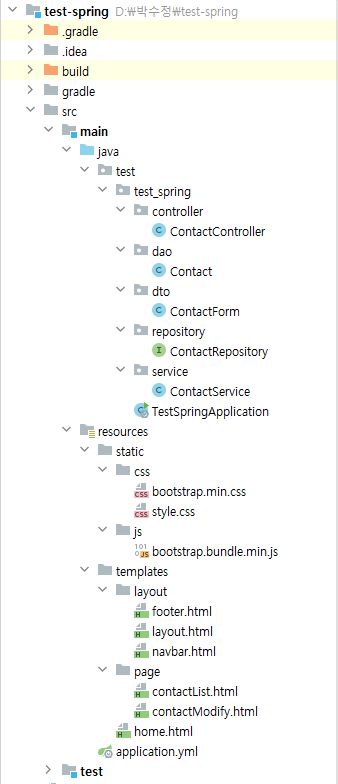
<경로>
'Framework > Spring' 카테고리의 다른 글
| [Spring] 코드 프로젝트 (0) | 2024.12.05 |
|---|---|
| [Spring] 시큐어 코딩 예제 (0) | 2024.11.22 |
| [Spring] 에러 페이지 예제 (0) | 2024.11.12 |
| [Spring] 검색 기능 예제 (0) | 2024.11.11 |
| [Spring] Thymeleaf - Paging (0) | 2024.11.06 |