DBMS 설치하기
1. 다음 링크로 들어가서 MySQL 설치. 371M용으로 다운로드
https://dev.mysql.com/downloads/windows/installer/5.7.html
MySQL :: Download MySQL Installer
MySQL Installer 5.7.44 Note: MySQL 8.0 is the final series with MySQL Installer. As of MySQL 8.1, use a MySQL product's MSI or Zip archive for installation. MySQL Server 8.1 and higher also bundle MySQL Configurator, a tool that helps configure MySQL Serve
dev.mysql.com
2. MySQL의 자바 드라이브인 'mysql-connector-java-5.1.45.zip' 다운로드
https://downloads.mysql.com/archives/c-j/
MySQL :: Download MySQL Connector/J (Archived Versions)
Please note that these are old versions. New releases will have recent bug fixes and features! To download the latest release of MySQL Connector/J, please visit MySQL Downloads. MySQL open source software is provided under the GPL License.
downloads.mysql.com
3. 1번에서 설치한 파일을 실행 후 설치. 체크 사항은 다음 사진을 참고한다.

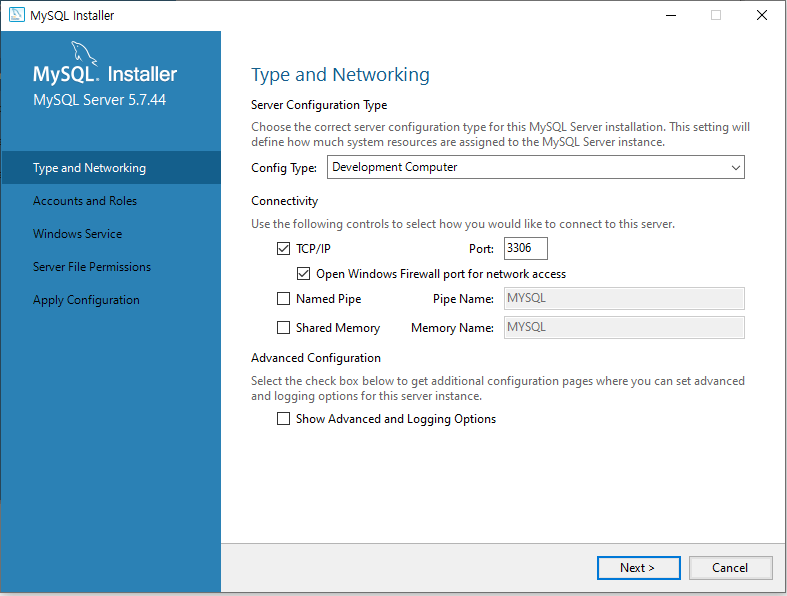


4. 데이터베이스 외부 관리 툴 설치. installer, 32/64 bit combined를 클릭해서 다운로드
https://www.heidisql.com/download.php#google_vignette
Download HeidiSQL
Download HeidiSQL 12.8, released on 11 Jul 2024 Installer, 32/64 bit combined ≃ Portable version (zipped): 32 bit ≃ 64 bit ≃ Stable link to latest portable version: 32 bit 64 bit Sourcecode Previous releases v12.7 (revision 6850) from 05 May 2024: 32
www.heidisql.com
5. 다운로드한 HeidiSQL 설치 후 실행. 아래의 신규를 클릭하고 암호는 아까 MySQL시 설정한 비밀번호 입력
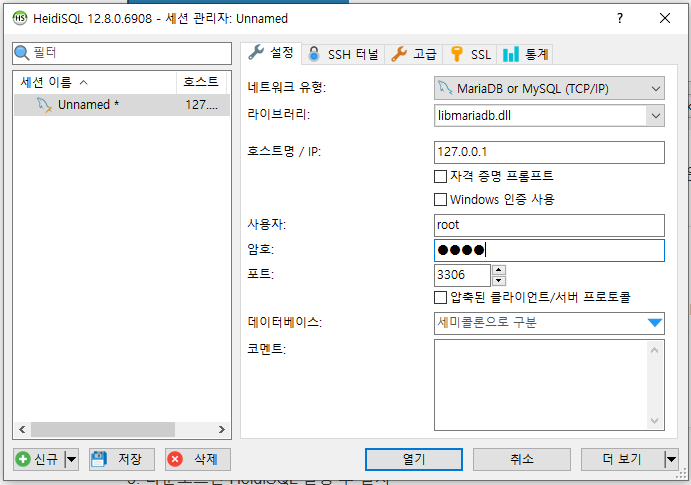
기본적으로 MySQL 자체에서 제공하는 비주얼 툴도 존재하기 때문에,
HeidiSQL을 설치하지 않고 터미널을 이용해서 데이터베이스에 접속할 수도 있다.
* 명령 프롬프트 진행 시 데이터베이스 접속 명령어
C:\Program Files\MySQL\MySQL Server 5.7\bin> mysql - u root -p [ENTER]
Enter password : **** [1234 입력]
'Web Programming > JSP' 카테고리의 다른 글
| [JSP] JDBC로 데이터베이스 연동 (0) | 2024.10.08 |
|---|---|
| [JSP] 데이터베이스 작성 (3) | 2024.10.08 |
| [JSP] 자바빈즈 (0) | 2024.10.07 |
| [JSP] 서블릿에서 세션 사용하기 (0) | 2024.10.07 |
| [JSP] 서블릿의 요청 방식 (0) | 2024.10.07 |